A Telegram client, a browser, your cloud drives, creative studios and your own PC, built as one Windows app so work can move between them. Each part below is shown as it is today, with real screens. The app does more than any page lists.
Telegram workspaceBuilt
Years of Telegram, finally findable.
You know it's in there somewhere: the PDF someone sent in 2022, the voice note you meant to keep, the link from a channel you've since muted. Supergram is a full Telegram desktop client that reads your chats into an index on your own PC, so finding something again takes a search, not an evening of scrolling.
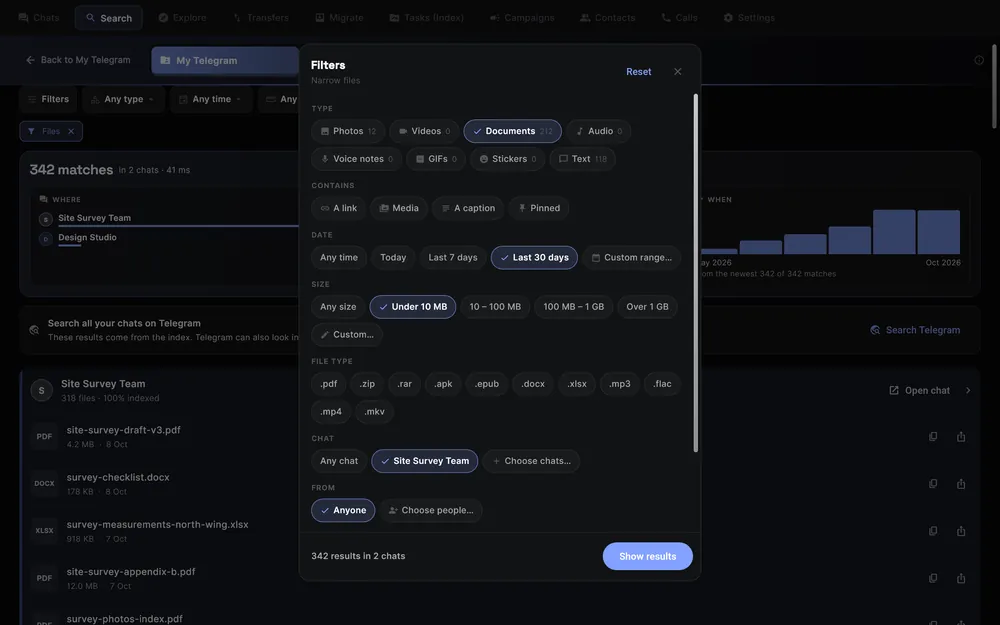
Archive searchAcross every indexed chat, narrowed by type, date, size, chat and sender.
Several accountsSide by side, with Split View to keep an eye on them together.
Media and filesEach chat's videos, photos and files in their own tabs.
Keyword MonitorA quiet note when the words you care about come up.
Links stay insideLinks from chats open in Super Browser, next to the conversation.
Official API, your accountBuilt on TDLib, Telegram's own library, and it works within Telegram's limits.
Supergram · Search
Search across your archiveReal screen · sample data
Transfers and migrationBuilt
Big moves, without babysitting them.
Moving a few hundred files shouldn't need your full attention. Say what you want once, such as only videos, only this year, or only files over a size, and see how much that is before anything starts. Then let it run in the background while you get on with your day.
Filtered downloadsFrom one chat or many, with pause, resume and retry that survive a restart.
One queueUploads and downloads in the same place, each file saying what it is doing.
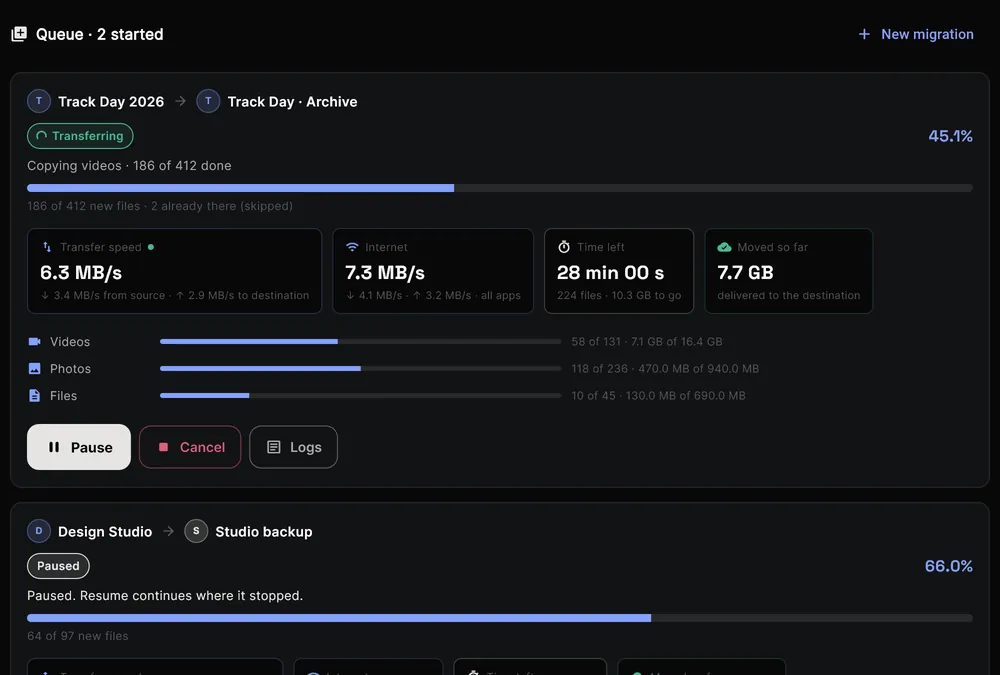
Archive migrationBetween channels, groups, chats and Saved Messages, in full or filtered, with a preview first.
Precise filtersDate, size, sender, filename, caption, duration, forwarded or original.
Honest progressPlain states like “Waiting for Telegram · 12s”, never a bar that moves while nothing happens.
Supergram · Migrate
Archive MigrationReal screen · sample data
Super BrowserBuilt
A browser that understands what is on the page.
Most of what you keep starts on a web page. Super Browser opens pages inside the workspace and sees what they hold, so a document, a video or a table can go straight to a chat, a drive or a folder, without the downloads folder in between.
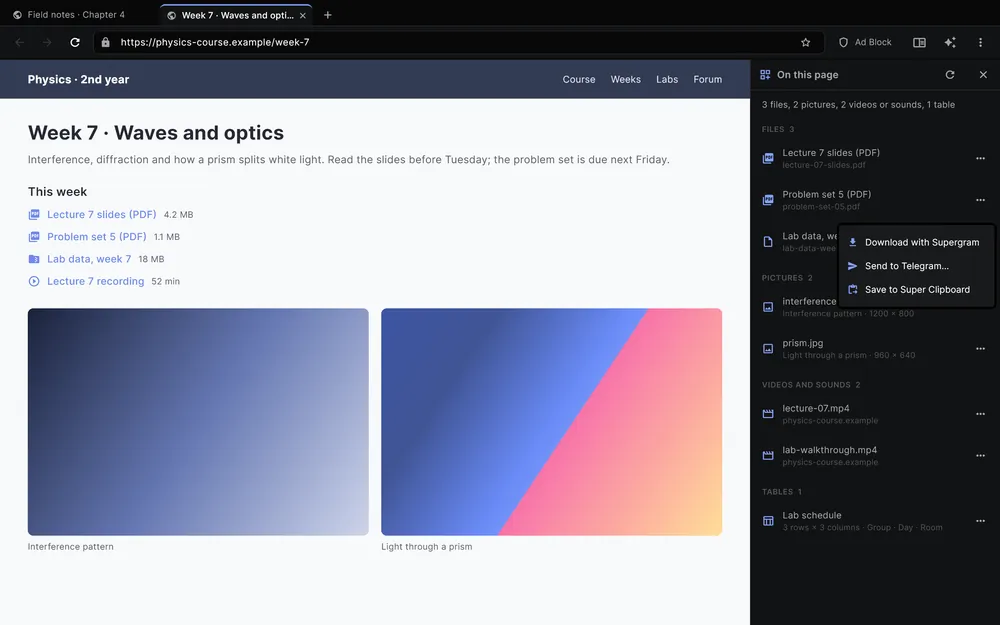
On this page…Lists the files, pictures, videos and tables on any page.
Send it onDownload with Supergram and Send to Telegram… for anything you find.
Useful shortcutsDownload video, Save table as CSV and Compress picture…, right from the page.
Quieter pagesAd blocking is on by default.
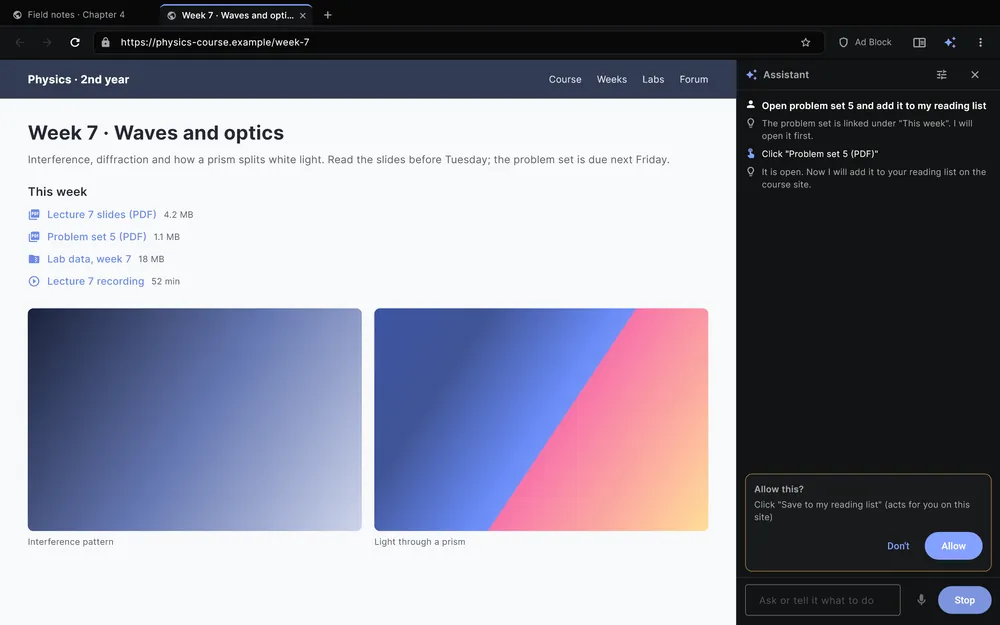
An assistant, in testingIt reads, scrolls, clicks and types for you, and stops to ask before it submits anything.
Super Browser
On this page…Real screen · sample data
Super Browser · Assistant
The assistant asks firstReal screen · sample data
Super Browser scriptsIn development
Let the browser keep watch for you.
Some jobs on the web never really end. You check the same channel for new videos, or the same post for new comments, again and again. Scripts are being built for exactly that: you set a job up once, and it keeps running in the background on your PC, doing the work or telling you when something needs you.
Super Browser · ScriptsIllustration
YT
YouTube channel → NotebookLM
RunningNew uploads, as they appear
IG
Comments on my post that say “price”
WatchingAround the clock
FB
Same on YouTube and Facebook
Point it at a video or a post
New comment with “price”With the comment and a link straight to it.
Collect
Get the video links from this YouTube channel and add them to my NotebookLM notebook.
Opens the channelIn Super Browser, signed in as you.
Gathers the linksEvery video, then each new one as it appears.
Adds them to the notebookAs sources in the notebook you picked.
Keeps a recordSo you can see what was added and when.
Watch
Tell me when someone comments ‘price’ on my Instagram post.
Watches the postChecks the comments for you, around the clock.
Matches your wordsOne keyword or several.
Lets you knowWith the comment and a link straight to it.
Same on YouTube and FacebookPoint it at a video or a post.
These are two examples of many. A script can be a simple routine that runs on your PC, or it can use your AI model to read a page and decide what matters. Scripts run while your PC is on and Supergram is open, which it can stay in the system tray. They are in development, and the examples show how they are meant to work.
Super CloudIn testing
All your drives, finally on speaking terms.
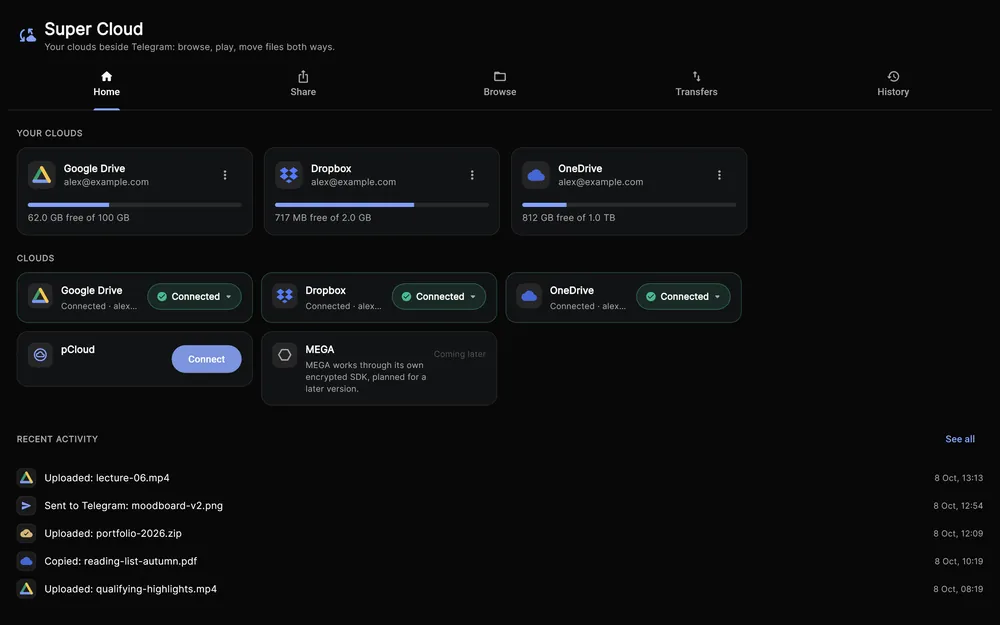
Your files live in drives you picked at different times, for different reasons. Super Cloud puts them side by side and connects them to everything else in the workspace, so a file can move from a chat to a drive, or from one drive to another, without the download-and-upload dance.
Telegram and cloudChat to drive and drive to chat, on one file or many.
Cloud to cloudCopies between providers, without your PC as a manual middle step.
One to manyThe Sharing Portal sends one file to several chats and folders, with a history of every transfer.
Careful accessGoogle Drive access is limited to files Supergram creates or opens, not your whole drive.
Super Cloud
Super CloudReal screen · sample data
Google Drive
Dropbox
OneDrive
Box
pCloud
Yandex Disk
Creative StudioBuilt
The file you received is rarely the file you send.
A recording needs trimming, a video is too big for the chat, a scan needs to become a document. Creative Studio puts real tools for video, audio, images and PDFs next to the files they are for, and runs them on your own PC.
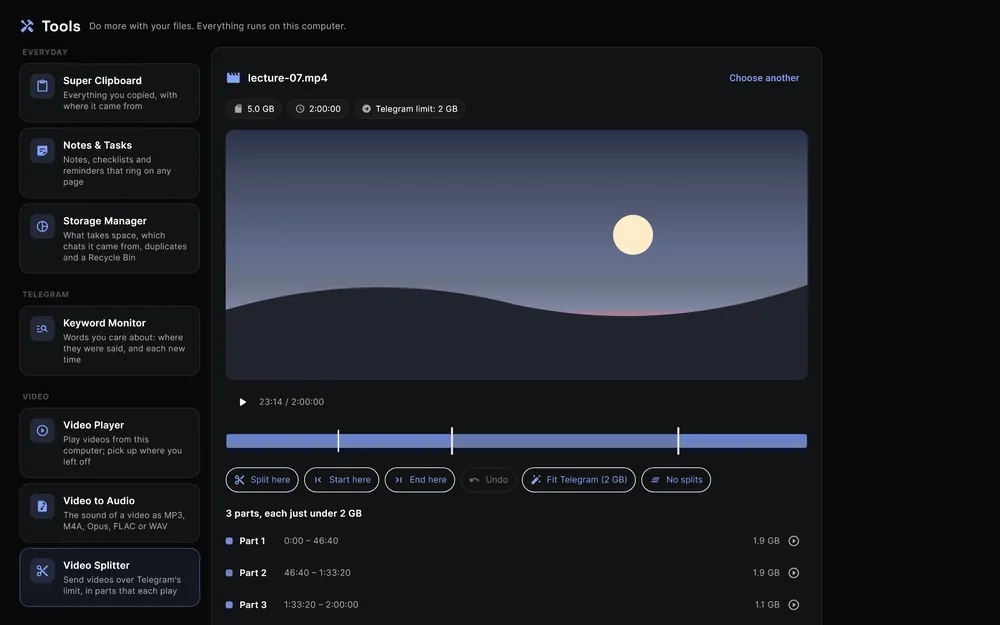
VideoVideo Studio, Video Player, Video Splitter and Video to Audio. Cut by editing the transcript; split a big video into parts that fit Telegram.
Audio and speechAudio Studio, Noise Remover and Speech to Text.
ImagesImage Editor, Image Compressor, Pictures to PDF and Pictures from a PDF.
DocumentsPDF Viewer and Editor, Book View, PDF to Pictures, PDF Pages and PDF to Word.
On your PCFiles are processed locally. Heavier engines install the first time you use them, after you confirm.
Creative Studio · Video Splitter
Video SplitterReal screen · sample data
Your PCBuilt
Underneath it all, your own computer.
Supergram isn't a website in a wrapper. It is a Windows app with full access to your files, so the workspace reaches the folders you already use instead of asking you to move everything somewhere new.
Files on this PCA full file browser for every drive and folder: find, copy, move, rename, extract archives.
Storage ManagerShows what is taking space and plans a safe cleanup. Nothing is deleted without you.
Super ClipboardWhat you copied, kept and easy to find again.
Notes and TasksWith reminders, right next to the work they are about.
Super AccountsIn development
A place to meet the people who work like you.
Separate from Telegram, Super Accounts will be Supergram's own way to talk: a profile, person-to-person chats and a global space, with suggestions of people and communities who share your interests. It is being built and tested internally.
Profiles and chatsSupergram profiles, person-to-person chats and a global conversation space.
DiscoveryPeople and communities with shared interests.
CallsPlanned. Not available yet.
How it fits together
Every part can hand work to the next.
Each part is useful on its own. What changes things is that a file, a page or a result can go straight to the next tool, and Super Intelligence can reach all of them. Choose a part to see what it connects to.
Select a part to see how it connects. Dashed means in development.
Super IntelligenceIn testing
The intelligence layer. It understands a request, finds the commands that fit across every other part, runs them in order and stops for your approval before anything leaves your hands.
Every part
Each feature is built with a command SI can call, so new features reach SI from day one.
Your models
Local runtimes or your own key for an OpenAI-compatible service or Anthropic.
You
Permissions per area, approvals for sensitive steps, a record of every action.
Super Workspace & your PCBuilt
The desktop environment everything lives in, with full access to the files on your computer. Move from chats to files to tools without switching applications.
Files
A full file browser for every drive and folder: find, copy, move, rename, extract archives.
Storage
Storage Manager shows what's taking space and plans a safe cleanup. Nothing is deleted without you.
Everyday
Super Clipboard, Notes & Tasks and reminders, next to everything else.
Super BrowserBuilt
A browser inside the workspace, not another window. Web content can flow straight into your chats, drives and tools.
Telegram
Send to Telegram… for any file, picture or link on a page.
Your PC
Download with Supergram, Save table as CSV, Compress picture…
SI
An assistant that reads, clicks and types on pages, and asks before it submits. In testing.
Scripts
Small jobs that keep watching pages for you in the background. In development.
Telegram WorkspaceBuilt
A full Telegram desktop client for people with years of messages and files: search across your archive, retrieve anything, move it where it belongs.
Super Cloud
Upload to cloud… from any message with a file; Send to Telegram… from any file in a drive.
Creative Studio
Open a file from a chat in a tool and send the result back. Video Splitter sends big videos as Part 1 of N.
Super Browser
Links from chats open inside Supergram.
Super AccountsIn development
Supergram's own communication layer, separate from Telegram: a Supergram account to talk with other Supergram users around the world, find people and communities, and later call them.
Accounts
Supergram profiles, person-to-person chats and a global conversation space are being built and tested internally.
Discovery
Suggestions of people and communities with shared interests.
Calls
Planned. Not available yet.
Super CloudIn testing
One place to work across your cloud drives, connected to the rest of the workspace. Connected file infrastructure, not just an uploader.
Telegram
Files from chats to a drive, and from a drive into chats.
Cloud to cloud
Copy between providers without downloading to your PC first.
One to many
The Sharing Portal sends one file to several chats and folders.
Creative StudioBuilt
Video, audio, image and PDF tools that work on files wherever they came from: a chat, a drive, a web page or a folder on your PC.
Telegram
Edit what you received, send back what you made.
Your PC
Everything is processed on your computer. Heavier engines install only after you confirm.
SI
Every tool has commands SI can run, from trimming to converting.
Real workflows
Jobs that used to cross half a dozen apps.
These are built today as ordinary menu items you can click yourself. Super Intelligence is learning to run them from a single sentence.
Creators
From a video in a chat to a shared, finished cut.
Received on TelegramDownloads in the background queue.
Video StudioCut by editing the transcript.
Video to AudioA podcast version in one step.
Upload to cloud…The master copy goes to your drive.
SharedToo big? It goes out as Part 1 of N.
Researchers
From a web page to a reading list in your drive.
Super BrowserOn this page… lists every document.
DownloadAll of them land in one list.
OrganiseFolders and batch rename in Files.
Read or convertBook View, PDF to Word.
Save to cloudAvailable on every device you use.
Community admins
From a years-old group archive to a clean new channel.
Index on your PCChats become searchable locally.
Search with filtersType, date, size, chat, sender.
MigratePick what moves, check the preview.
Runs in the backgroundPause, resume, see why it's waiting.
Teams
From files spread over drives to one shared folder.
Super CloudYour drives side by side.
Cloud to cloudCopied across, no local detour.
Sharing PortalOne file to several chats at once.
HistoryEvery transfer listed afterwards.
Who it's for
Made for people whose work lives in many places.
Creators
A long recording in. A trimmed cut, an audio version and a post for the channel out.
Editing, processing and distribution in one place, from the file you received to the file you publish.
Video StudioVideo to AudioSharing Portal
Developers & technical users
Pick the model, connect it to real tools, and see every action it took.
Local or bring-your-own AI, permission controls and a full action record.
Local modelsOwn API keyFiles on this PC
Community & channel admins
Move years of content to a new channel, and hear about it when the words you care about come up.
Large archives, many accounts and content distribution, handled with filters and previews.
MigrationKeyword MonitorMultiple accounts
Telegram power users
Find the file someone sent two years ago without scrolling for it.
Archive search, filtered downloads and background transfers across accounts.
Local indexSplit ViewTransfers
Researchers & students
Every PDF from a course group in one folder, readable as a book, and the lectures as text you can search.
Large collections of documents, recordings and references, organised.
SearchBook ViewSpeech to Text
Productivity-focused people
A browser, drives and PC folders that hand work to each other instead of to you.
Fewer apps to switch between, fewer files to move by hand.
Super BrowserSuper CloudSuper Clipboard
Early access
Be among the first to try it.
Early access opens on Windows, a small group at a time. Leave your email and I'll write to you when it's your turn. What early users tell me will shape what I build next.
I'm Gowtham, and I build Supergram. If you want to ask something, suggest something, work together, or just talk, write to me here. Every message comes straight to my inbox, and I read and answer them myself.